Flat Rate vs. Tiered Packages: What's the Best Way to Price Your Music Lessons?

As a music teacher, your passion is teaching — not chasing invoices or getting lost in a pricing tangle. But when it comes to running your studio like a business, your pricing model plays a huge role in how sustainable, professional, and stress-free your day-to-day operations feel.
Choosing between per-lesson pricing, monthly flat rates, or tiered lesson packages isn’t just about what’s easiest — it’s about what fits your teaching style, supports your income goals, and creates clarity for your students.
In this article, we’ll break down the most common lesson pricing models, explore the benefits and drawbacks of each, and show you exactly how MySymphony supports all of them — with smart, customizable tools inside the Services & Items dashboard.
Why Your Lesson Pricing Model Matters
A common struggle among music teachers is balancing flexibility with financial consistency.
You might start with per-lesson rates to keep things simple, only to find yourself dealing with:
- Last-minute cancellations
- Missed payments
- Unpredictable income
Or maybe you’ve considered monthly tuition plans or multi-lesson packages, but feel unsure how to manage them without spending extra time on tracking and follow-up.
- Your pricing model affects:
- Student commitment
- Your ability to forecast revenue
- How professionally your studio is perceived
Your bandwidth for growth and retention
The good news? There's no one-size-fits-all answer. And with a flexible system like MySymphony, you can build a pricing structure that truly works for your business.
Three Common Music Lesson Pricing Models (And How to Use Them)
1. Pay-Per-Lesson (Flat Rate)
This model is exactly what it sounds like — students pay for each individual lesson as they take it.
Pros:
- Simple and familiar for students
- Good for trial lessons or casual learners
- Easy to set up when starting out
Cons:
- High potential for no-shows and cancellations
- Inconsistent income
- More admin work to collect payments lesson-by-lesson
Best for:
Teachers just starting out, or those working with highly flexible or short-term students (e.g., adult learners or one-time coaching clients).
2. Monthly Flat Rate (Tuition Style)
With this structure, students pay the same amount each month, whether there are 4 or 5 weeks in the month.
Pros:
- Predictable income
- Encourages long-term commitment
- Makes budgeting easier for both teacher and student
Cons:
- Requires clear communication about holidays, missed lessons, and makeups
- May feel too rigid for families who prefer pay-as-you-go
Best for:
Full-time teachers or studio owners looking for a sustainable business model.
3. Tiered or Package Pricing
This model allows you to offer multiple options — for example, Bronze (2 lessons/month), Silver (4/month), or Gold (4/month plus practice plans and bonuses). You can also sell packages like “10-lesson bundles.”
Pros:
- Appeals to a wider range of students
- Gives you the opportunity to upsell higher-value packages
- Works well for group classes or specialized programs
Cons:
- Requires tracking lesson credits if you don’t have a system in place
- Slightly more complex to explain without a visual or breakdown
Best for:
Studios offering different commitment levels, or teachers who want to add value through additional services.
How MySymphony Supports Any Pricing Model You Choose
Inside MySymphony, you can build and manage any of these pricing structures — seamlessly — using the Services & Items section of your dashboard.
Let’s break it down:
The Services Tab: Where You Build Bookable Lessons & Packages
The Services area is where you define what students can book — lessons, classes, rentals, or tiered programs.
When you Create a New Service, you can:
- Set a Lesson Name (e.g., “30-Minute Piano Lesson” or “Gold Plan – Weekly Lessons + Progress Reports”)
- Choose Duration and Price
- Assign a Category (for filtering or organization)
- Enable Deposits, set a Capacity, and define if the service is Recurring
- Choose to hide price or duration, useful for packages or custom quotes
- Assign the service to specific teachers
- Attach relevant items, like books or materials
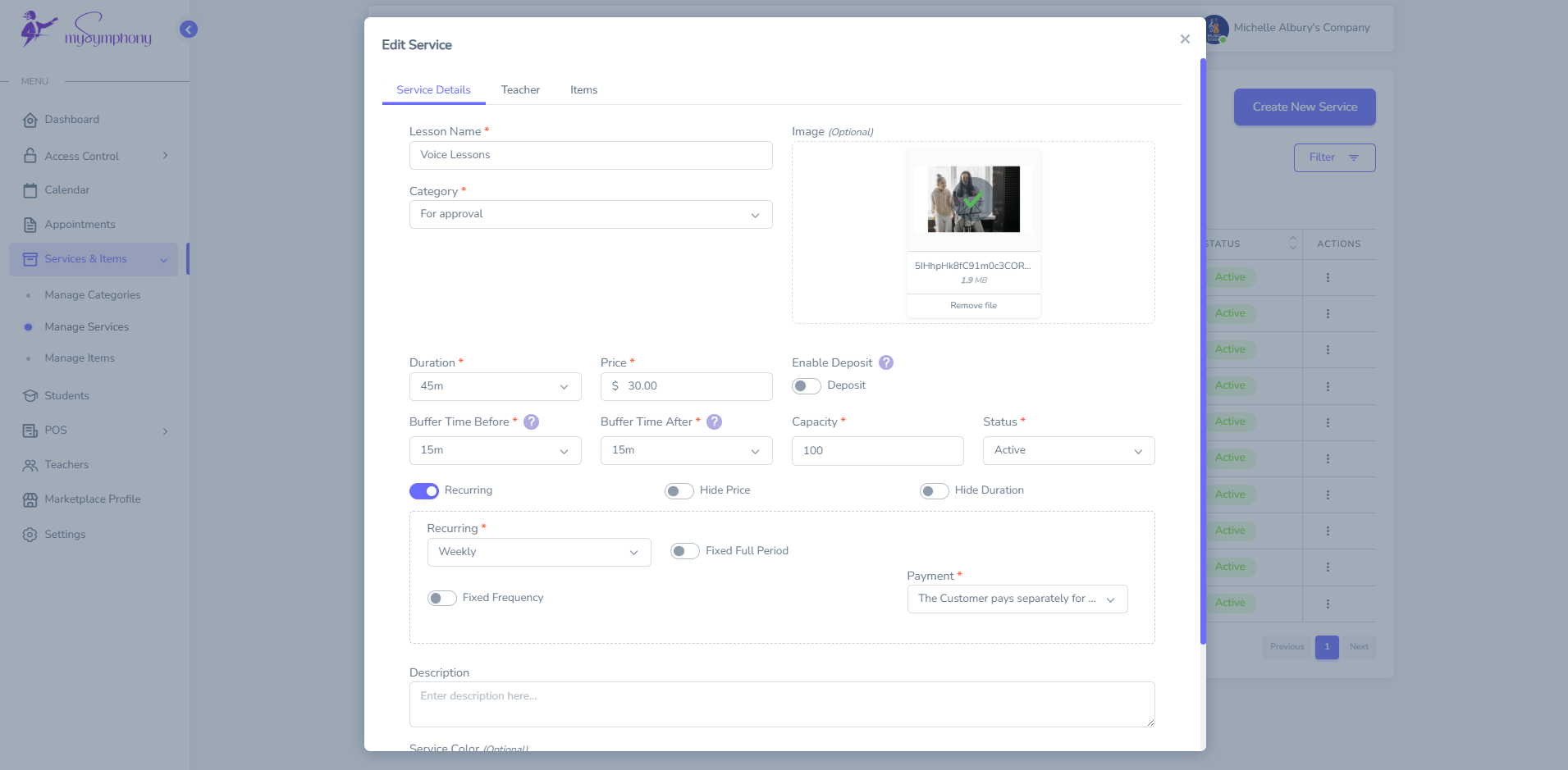
This gives you total control over how you charge — from simple flat rates to advanced, multi-tiered pricing plans.
Each service you set up becomes selectable in your student portal or internal calendar. Students can book, pay, and receive automated confirmations without you lifting a finger.
The Items Tab: For Non-Bookable Things Like Materials & Rentals
Not everything in your studio is a bookable service. Some things — like books, reeds, guitar strings, or even a rental piano — are one-time or ongoing items that need to be billed but not scheduled.
That’s where Items come in.
When you go to Manage Items and click Create New Item, you’ll be able to:
- Name the item (e.g., “Beginner Violin Book,” “Guitar Rental – Weekly”)
- Set price and tax options
- Mark it as non-bookable
- Assign it to a category (like "Merchandise" or "Rental")
- Add optional SKU, status, and description
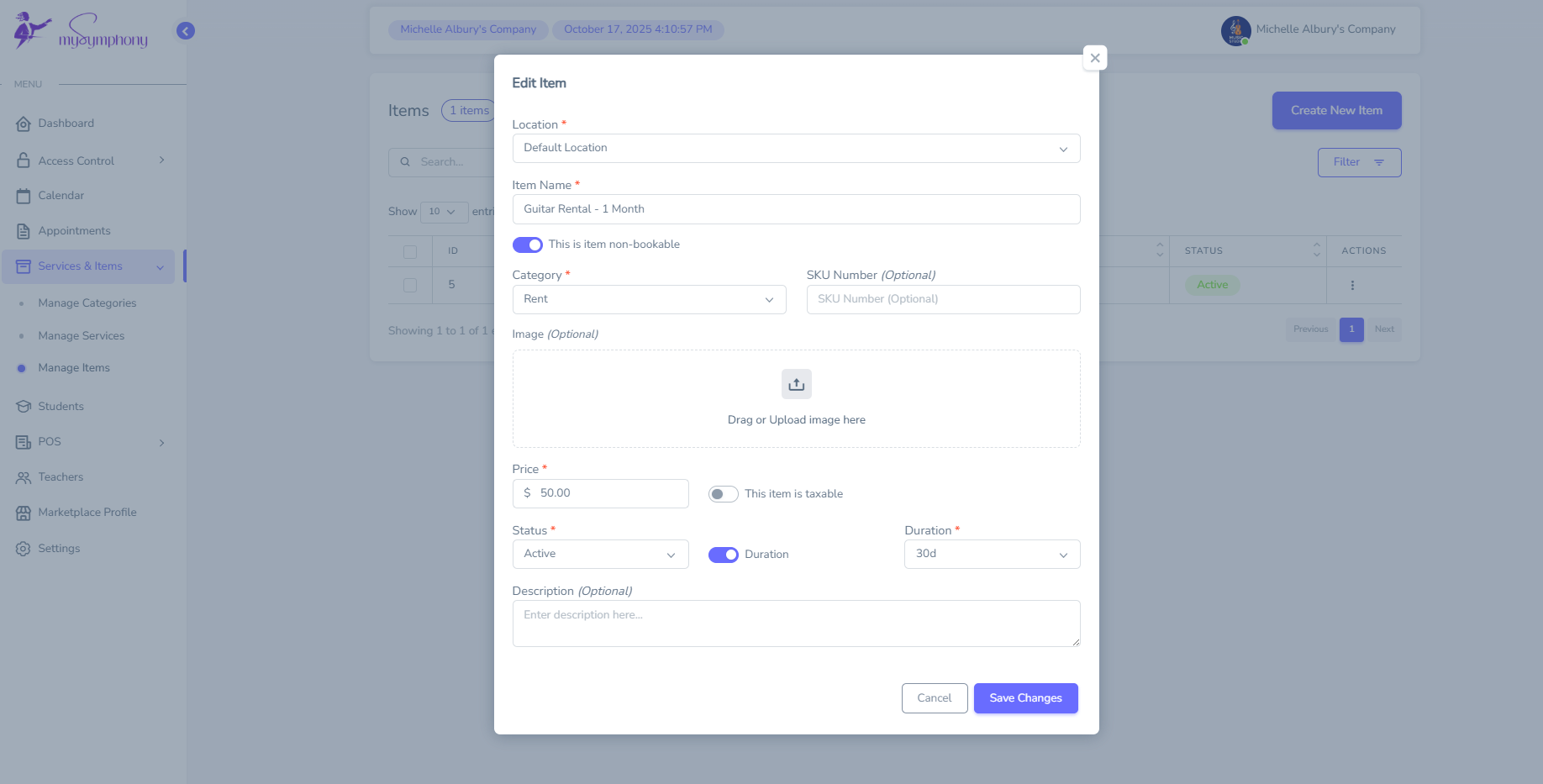
This lets you streamline your billing and inventory, making sure everything you offer — from lessons to physical items — is easy to find and manage.
Real-World Example: Combining Packages + Add-ons
Let’s say you want to offer a premium monthly package:
“Piano Mastery Plan – $180/month”
Includes:
- 4 weekly 45-minute lessons
- Access to digital sheet music
- One book per quarter
- Practice check-ins
Inside MySymphony, you would:
- Create a New Service with the lesson duration, price, and category.
- Attach items like “Book: Level 1” or “Digital Practice Journal” from your Items tab.
- Mark the service as recurring and assign it to your piano teacher.
- Enable automated scheduling and billing.
Done.
Your student (or their parent) can now select that service plan from your portal, book their time slot, and handle payment — all without back-and-forth emails.
Conclusion: The Right Pricing Model is the One That Works for You
Whether you're a one-person teaching studio or managing multiple instructors and programs, there is no “perfect” pricing model — only the one that supports your workflow, values your time, and encourages student consistency.
With MySymphony, you don’t have to compromise.
- Use per-lesson pricing for trials or casual learners.
- Offer monthly tuition for committed students.
- Build bundled or tiered plans to grow your revenue.
- Sell books, accessories, and rentals without managing a separate store.
It’s all centralized under Services & Items, giving you control, clarity, and the automation you need to run a professional studio with ease.
Ready to simplify your pricing and give your students a better booking experience?
Join the MySymphony for free today — and see how easy it can be to build a studio that works for you.
Contents
Related Articles
Stay Connected
Get tips, tools and updates for music teachers. Subscribe for free resources, success stories and insights to simplify your studio and inspire students.